Signage 3D Mockup: A Modern Tool for Professional Visual Presentations
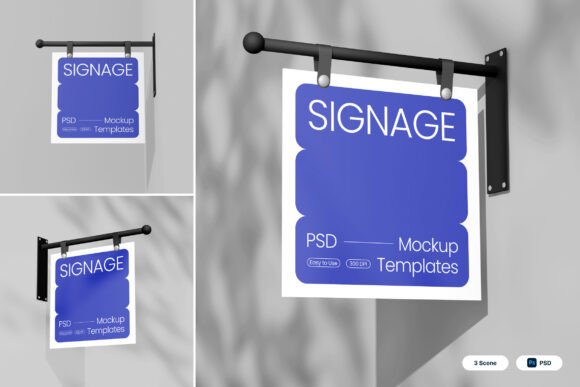
Designing effective signage is a crucial aspect of branding, whether you're running a small boutique or managing a large commercial establishment. In today's visually driven market, the ability to present your ideas in a realistic and professional manner can make all the difference. This is where Signage 3D Mockup comes into play. It offers a modern, realistic approach to showcasing signage designs with features like hanging bracket structures, clean vertical layouts, smooth matte surfaces, and contemporary storefront-inspired compositions.
Understanding Signage 3D Mockup
Signage 3D Mockup is more than just a design tool—it's a comprehensive solution that allows designers, business owners, and creators to visualize their signage concepts in a lifelike environment. With its bold blue and white color palette and realistic outdoor shadows, this mockup creates a professional urban aesthetic that is ideal for shop branding, cafe signage, boutique storefronts, restaurant promotions, office identification, and commercial wayfinding presentations.
The mockup includes three high-resolution PSD files (4000 x 3000 pixels at 300 dpi) that are designed to be user-friendly. One of the standout features is the use of smart object layers, which allow users to simply double-click a layer, place their design, and save it—making the process intuitive and efficient.
Key Features of Signage 3D Mockup
- Realistic Hanging Bracket Structures: These add an authentic touch to the signage presentation, mimicking how signs would appear in real-world environments.
- Clean Vertical Display Layouts: The layout options ensure that your signage appears neat and organized, reflecting professionalism and clarity.
- Smooth Matte Surfaces: The surface textures are designed to look natural, enhancing the visual appeal of the mockup.
- Contemporary Storefront-Inspired Compositions: These compositions help in creating a modern look that aligns with current design trends.
- Bold Blue and White Color Palette: This combination adds a sense of sophistication and makes the signage stand out against various backgrounds.
- Realistic Outdoor Shadows: These shadows enhance the realism of the mockup, making it suitable for both indoor and outdoor applications.
Who Can Benefit from Signage 3D Mockup?
Signage 3D Mockup is a versatile tool that caters to a wide range of users. Here’s a breakdown of who might find it particularly useful:
- Business Owners: Whether you run a café, boutique, or restaurant, having a professional-looking sign is essential. This mockup helps you visualize how your signage will look before investing in physical production.
- Graphic Designers: Designers can use this mockup to present their work in a more engaging and realistic format, helping clients understand the final product better.
- Marketing Professionals: For those involved in marketing campaigns, this tool can be used to create compelling visuals for promotional materials and presentations.
- Students and Educators: Those studying graphic design or related fields can benefit from using this mockup as part of their learning process or project work.
- Freelancers: Freelance designers can showcase their work more effectively by presenting it in a realistic context, increasing client satisfaction and trust.
Practical Applications of Signage 3D Mockup
Signage 3D Mockup can be applied in various real-world scenarios. Some examples include:
- Shop Branding: Use the mockup to create eye-catching store signs that reflect your brand identity.
- Cafe Signage: Showcase your café’s logo and menu in a realistic setting, giving potential customers a glimpse of what to expect.
- Boutique Storefronts: Present your boutique’s signage in a way that highlights your unique style and products.
- Restaurant Promotions: Create promotional materials that feature your restaurant’s signage in a realistic environment.
- Office Identification: Use the mockup to design office signs that are both functional and aesthetically pleasing.
- Commercial Wayfinding: Help visitors navigate through your space with clear and attractive signage that is easy to understand.
Evaluating the Suitability of Signage 3D Mockup
Before deciding to use Signage 3D Mockup, it's important to consider several factors that may influence its suitability for your specific needs. Here are some points to keep in mind:
Strengths:
- High-Quality Resolution: The 4000 x 3000 pixel size ensures that your designs look sharp and detailed, even when printed at larger sizes.
- User-Friendly Interface: The smart object layers make it easy to customize the mockup without needing advanced technical skills.
- Versatile Design Options: With multiple composition styles, you can choose the one that best fits your project requirements.
Considerations:
- Image Stock Not Included: While the mockup provides a realistic background, the image stock used within the files is not included. You may need to source additional images or graphics separately.
- Limited Customization: Although the smart object layers offer flexibility, there may be limitations in terms of modifying the overall structure or layout of the mockup.
- Learning Curve: If you're new to using Photoshop or similar design software, there may be a learning curve associated with utilizing the mockup effectively.
Limitations:
- Not Suitable for All Projects: While the mockup is excellent for signage-related projects, it may not be the best choice for other types of design work that require different elements or formats.
- Dependence on Software: To fully utilize the mockup, you'll need access to Adobe Photoshop or a compatible design application.
Getting Started with Signage 3D Mockup
If you're ready to start using Signage 3D Mockup, here are a few steps to get you started:
- Download the Files: Obtain the three PSD files and the accompanying PDF help guide from a trusted source.
- Review the Help Guide: Take some time to go through the PDF help file to familiarize yourself with the features and functionality of the mockup.
- Open in Photoshop: Launch Adobe Photoshop and open one of the PSD files to begin customizing your design.
- Use Smart Object Layers: Locate the smart object layers and double-click them to insert your own design elements.
- Save Your Work: Once you're satisfied with your customization, save the file and prepare it for presentation or printing.
By following these steps, you can quickly and easily create a professional-looking signage mockup that accurately represents your design vision.
Final Thoughts on Signage 3D Mockup
Signage 3D Mockup is a powerful tool that can elevate your signage design process by providing a realistic and professional presentation format. Its features such as hanging bracket structures, clean vertical layouts, and bold color palettes make it an excellent choice for a variety of applications. Whether you're a business owner looking to enhance your storefront or a designer aiming to impress your clients, this mockup offers a practical solution that is both versatile and user-friendly.
While there are certain considerations and limitations to keep in mind, the benefits of using Signage 3D Mockup far outweigh the drawbacks. By taking the time to evaluate its suitability for your specific needs and following the proper setup steps, you can unlock its full potential and create stunning signage presentations that leave a lasting impression.